Reproduction of Color Part 3: Colorimetry
I prepared this material to be delivered in spoken form to a mixed audience of game developers. Accessibility is prioritized over precision.
- Part 1: Physics of Light
- Part 2: Human Vision System
- Part 3: Colorimetry (You Are Here)
- Part 4: TODO
In this part, we will discuss colorimetry, or how we measure and quantify color using numbers.
Color Mixing
Before we begin, we need to understand precisely how color mixing works.
In the 1850s, Hermann Grassmann proposed a formal color mixing theory which was later experimentally supported and demonstrated by James Clerk Maxwell. Maxwell created wheels and tops with some ratio of colors, and observed the color appearance while it was spinning.
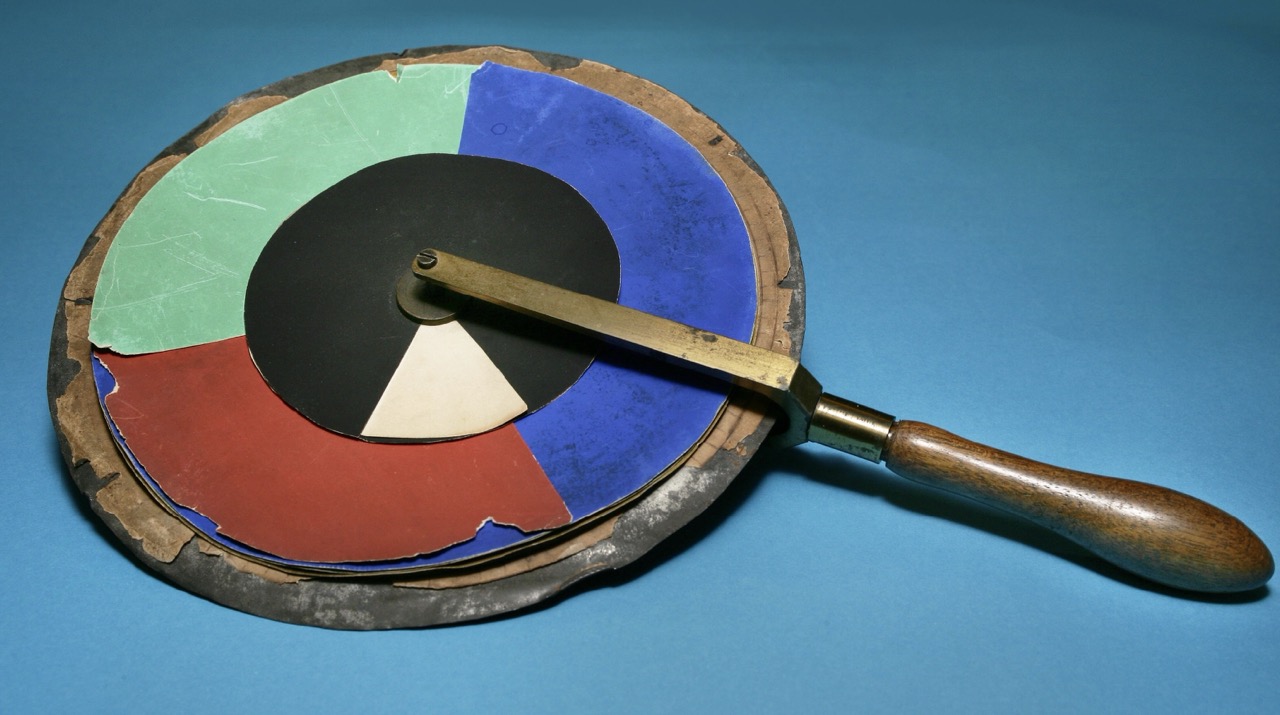
Maxwell’s colour wheel, University of Cambridge Digital Library (CC BY-NC 4.0)
Grassmann’s proposed rules rigorously predict how colors mix to produce new colors. These rules are known today as Grassmann’s laws.
Proportionality: If $A = B$ then $kA = kB$
Additivity: If $A = B$ and $C = D$ then $A + C = B + D$
The first rule, proportionality, states that if we have two matching colors (like some particular shade of “green”) with different spectral distributions, we can scale the intensity of both and they will still match each other in appearance.

The second, additivity, states that if we have two light sources for one color (like “red”), and two for another color (like “blue”), and the pairs match in appearance, then mixing any of the first pair with any of the second pair will produce the same appearance, even if the underlying spectra do not match.

Because of these rules, we can think of color mixing as addition and multiplication within a vector space. This allows us to think about colors geometrically. I conceptually illustrate here the mixing of two colors by vector addition.
Given what we discussed in part 2 about human perception, you can probably hazard a guess that we will eventually end up using a 3D space.

There are exceptional real-world cases such as extremely bright or dark conditions where these rules do not hold. But these rules are generally an excellent approximation.
At this point, we still don’t have a way to describe a color with numbers, and we haven’t proven here (yet) that a 3D space will be sufficient to represent every human color sensation. But, we do have a mathematically sound way to define a color as a ratio of two or more colors.
Color Matching Experiments
In 1913, an international standards organization for light, color, and vision called the CIE (Commission Internationale de l’Éclairage) was formed. This standards body still exists today. (https://cie.co.at)
In the early 1900s, there was no standard way of expressing a color across textiles, pigments, printing, lighting, and photography. It was also difficult to share research related to color. The CIE commissioned and coordinated work towards solving this problem.
David Wright and John Guild independently conducted experiments that involved matching test colors with combinations of other “primary” colors. Their results were combined and adopted to create the CIE 1931 standard.
| Wright (1929) | Guild (1931) |
|---|---|
 |
 |
Left: Wright, W. D. (1929). A re-determination of the trichromatic coefficients of the spectral colours. Transactions of the Optical Society, 30, 141–164
Right: Guild, J. (1931). The colorimetric properties of the spectrum. Philosophical Transactions of the Royal Society of London, 230, 149–187. https://doi.org/10.1098/rsta.1932.0005
Primary Colors
Both of these experiments used specific “primary colors,” so I want to define what that means exactly. Many of us were probably taught at a young age that specific colors like “red” or “blue” are primary colors.
(Yellow is typically used instead of green since kids are often mixing paint rather than mixing light. Mixing pigments is a subtractive process, and mixing light, as a display does, is an additive process.)
For this talk, when I mention primary colors, what I mean are the colors we choose to mix together to make other colors. We could choose literally any colors we want, assuming that none of them can be made by mixing the others. Or said in mathematical terms, they need to be linearly independent.

We need a way to exactly specify a primary. We haven’t derived a way to choose arbitrary human-visible colors yet, but we could start by picking colors that are formed by splitting light with a prism. Then we can reference them by their wavelength. Once we have well-defined “pure” colors, we can use the relationships between them to specify any color.
After we have derived a general system for representing any human-visible color with numbers, we will have a much easier time specifying our primaries precisely. So let’s do that!

The experiment
Here is the general procedure for the color matching experiments that were commissioned by the CIE, and performed by Wright and Guild:
A split field was projected onto a screen. On one side, observers viewed a test color. On the other side, they adjusted the brightness of 3 primary colors to match it.
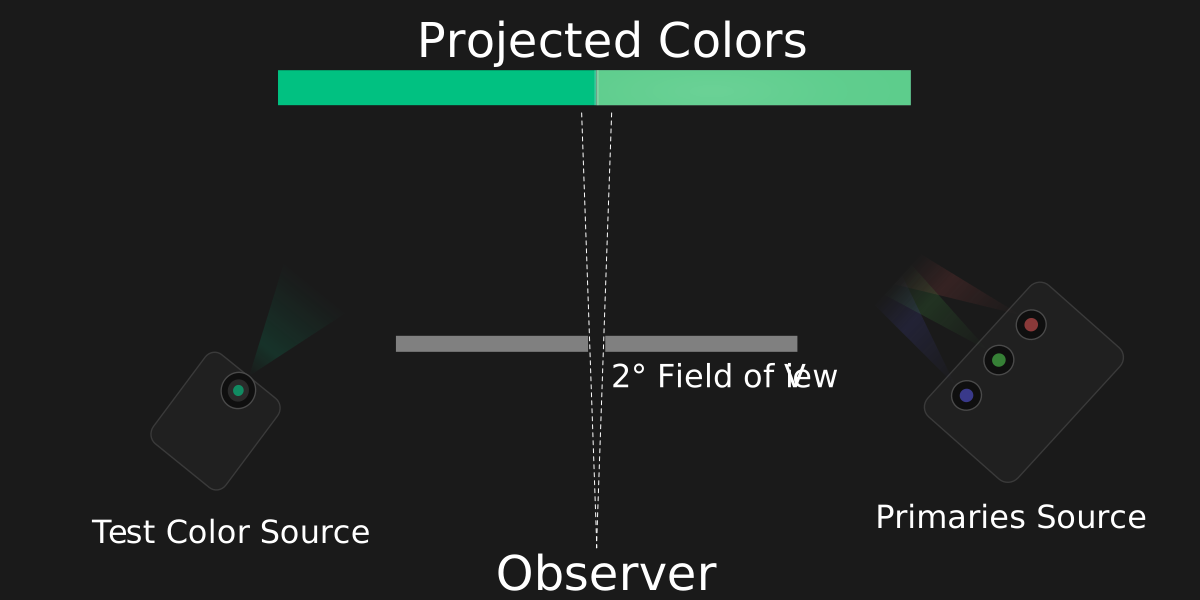
Overhead diagram of experimental setup
This experiment can be conducted with pure (or nearly pure) primary colors, or not. Both approaches were tried, and the results were consistent. All we really care about is that we have three linearly independent primary colors. The primary colors act as reference points in some three-dimensional space. One dimension for each primary.
Wright used primary colors that were nearly monochromatic, isolated with a prism. Guild used less pure primaries derived by passing light through gelatin filters.
You might notice a problem with this approach. What happened if the test color was a pure color that couldn’t be achieved by mixing the primaries?
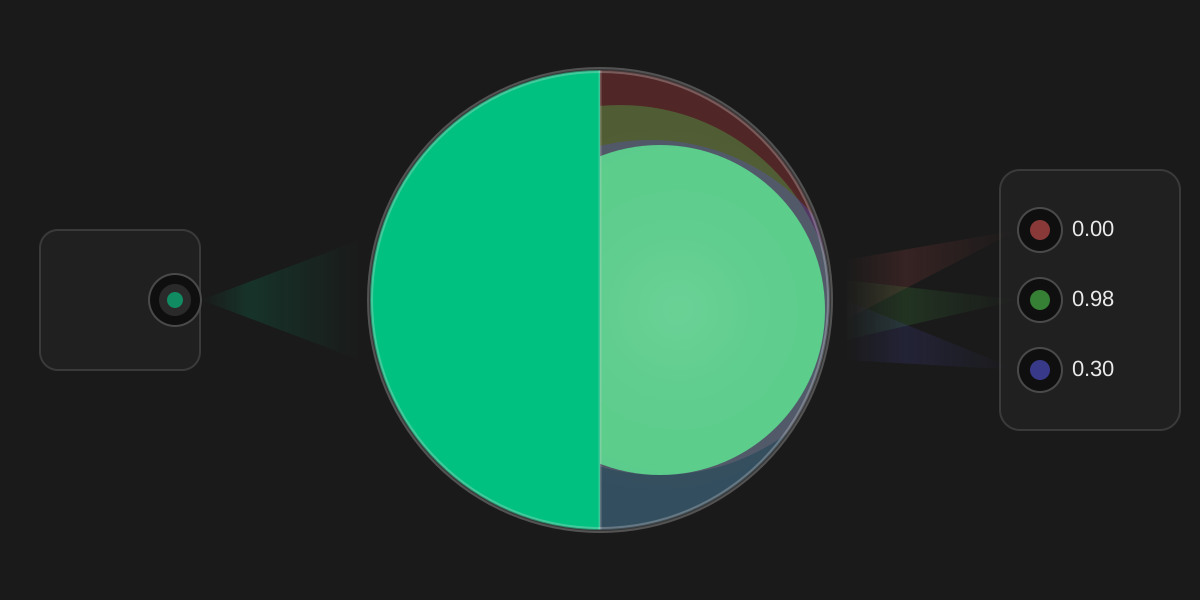
The color on the left is unable to be matched with the chosen primaries
In this case, the participant could add one of the primaries to the test color, making it less pure. Then it would be possible to match it with the remaining two primaries.
In this case, the ratio for the primary that was added to the test color was recorded as a negative value.
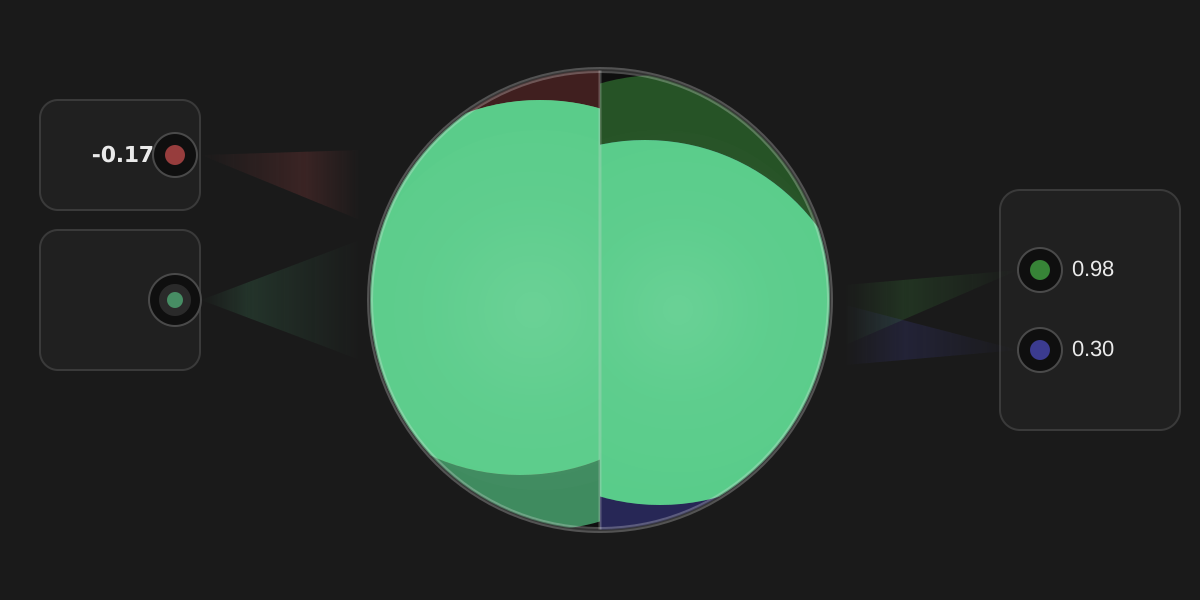
By moving the red primary to the right, we can desaturate the test color, making it matchable with the remaining primaries
Negative color ratios
I want to dig into the concept of a “negative” primary a bit more.
As mentioned earlier, we have a geometric relationship between our primaries. Since we assumed that they are linearly independent (i.e. we can’t reproduce any primary by mixing the other two), we can treat our three primaries as three basis vectors of a 3D space.

Now, let’s take an orthographic projection that orients our primaries as three points on a triangle. We can use Grassmann’s laws to interpolate between the primaries. (Grassmann’s laws require being in a linear space. An orthographic projection of a linear space remains linear, so Grassmann’s laws still apply.)

Here, I illustrate color matching using primaries that are less saturated than the test color. This test color can’t be created directly by mixing the primaries.
Notice what happens when I mix the test color with the most “distant” primary: it pushes it towards the other two primaries.

It looks something like this in 3D.
 |
 |
 |
|---|
Once the test color lies between the other two primaries, I can match it with a ratio of those two primaries. While it’s true that I can’t represent the original saturated color as a positive ratio of the three primaries, it is nevertheless possible to represent any color if I allow negative ratios and interpret them in this way.
This is a natural consequence of Grassmann’s laws - which let us express relationships between our primaries geometrically as a linear vector space.
One downside to representing colors as mixtures of three primaries is that such a mixture can match many spectral distributions. In a way, this is a form of lossy compression of the spectrum. But it’s lossy in a way that works well for human perception and is usually good enough.

Combining the experiments
The CIE combined the data from both experiments to create color matching “functions” - one function for each primary. We will call these functions $\bar r(\lambda)$, $\bar g(\lambda)$, and $\bar b(\lambda)$.
Each function, given a wavelength of light as input, describes the amount of the corresponding primary needed to match it. Really this is just tabulated observations at different wavelengths.
The X axis here is the wavelength, and the Y axis is the normalized ratio of each primary. (Here, “normalized” means dividing by the sum of the result of all color matching functions. The sum of the normalized values is always 1.)
 |
 |
|---|
Guild, J. (1931). The colorimetric properties of the spectrum. Philosophical Transactions of the Royal Society of London, 230, 149–187. https://doi.org/10.1098/rsta.1932.0005
Both experiments combined provide results from only 17 observers. However, further experiments since then have been fairly consistent with the combined CIE 1931 results.
If we don’t normalize the data and plot this in 3D, it looks like this. (We easily see the usage of “negative” red primary in the middle plot.)

Defining a Color Space
We now have a system for defining any human-visible color. Our first step required using single-wavelength colors as our reference points. Now that we have a geometric representation of color, we can freely choose any three linearly independent points within that space.
Further, we can even pick points that are outside of the volume of physically realizable colors. (This is why I like to think of primaries as reference points rather than colors.) These are called “imaginary primaries.”
The CIE selected new primaries that differed from the Wright and Guild experiments. First, they wanted to avoid negative numbers, so they chose imaginary primaries that fully enclose the volume of physically realizable colors. Second, they oriented the space such that Y would be proportional to a 1924 CIE standard that weights light according to human visual sensitivity. (It is formally named the “CIE 1924 Photopic Luminous Efficiency Function” and we’ll call it $V(\lambda)$ for short.)
Choosing new reference points is a linear transformation - it is like applying warping and scaling to the space to move it to some more convenient orientation. In the end, it is just a 3x3 matrix multiplication.
$$ M = \begin{bmatrix} 2.7689 & 1.7517 & 1.1302\\ 1.0000 & 4.5907 & 0.0601\\ 0.0000 & 0.0565 & 5.5943 \end{bmatrix} $$
These transformed color matching functions are called $X̄$, $Ȳ$, and $Z̄$, and the resulting color space is CIE 1931 XYZ. This color space remains the foundation for color measurement and the color spaces used in digital media today.
$$ \mathbf{M} \begin{bmatrix} \bar r(\lambda)\\ \bar g(\lambda)\\ \bar b(\lambda) \end{bmatrix}=\begin{bmatrix} \bar X(\lambda)\\ \bar Y(\lambda)\\ \bar Z(\lambda) \end{bmatrix} $$$$ \begin{aligned} \bar X(\lambda) &= 2.7689\,\bar r(\lambda) + 1.7517\,\bar g(\lambda) + 1.1302\,\bar b(\lambda)\\ \bar Y(\lambda) &= 1.0000\,\bar r(\lambda) + 4.5907\,\bar g(\lambda) + 0.0601\,\bar b(\lambda)\\ \bar Z(\lambda) &= 0.0000\,\bar r(\lambda) + 0.0565\,\bar g(\lambda) + 5.5943\,\bar b(\lambda) \end{aligned} $$

The XYZ functions are derived from a linear 3x3 matrix transform. So the XYZ color space remains linear, and Grassmann’s laws apply within it. Colors in XYZ space can be mixed by vector addition and are proportional to radiant power after weighting by human visual sensitivity. (And radiant power is grounded in physical units like Watts.)
XYZ values are not bounded by $[0,1]$. Y is proportional to luminance and can be scaled to represent real-world units. But in practice, since XYZ is linear, we can scale values before or after mixing without changing the final result, so we are generally most interested in the relative ratios of the XYZ coefficients.
This is not the typical plot used to discuss the CIE 1931 color spaces. It is more often illustrated in the normalized form that is discussed below.
Radiometric and Photometric Values
We usually express the “strength” of a spectrum in two ways: radiometrically, and photometrically.
Radiometric quantities measure physical electromagnetic energy or power in units like Joules and Watts. Radiometric quantities are completely independent of human perception.
When radiometric quantities are weighted by a standardized model of human visual sensitivity, they become photometric quantities. We use the CIE 1924 Photopic Luminous Efficiency Function denoted $V(\lambda)$ as our definition for human visual sensitivity. It was derived through human brightness-matching experiments. Common photometric units include lumens and candela.
Since the XYZ space is oriented such that Y is proportional to luminance, a photometric value, XYZ (and other linear RGB spaces derived from it) are proportional to radiant power weighted by $V(\lambda)$.
$V(\lambda)$ is just a “weighting” function. It is unit-less, and a scaling factor must be applied in addition to the weighting function to convert between units like watts and lumens.

Some game engines allow authoring with physical units, but this isn’t strictly necessary for physically grounded rendering. What matters is that lighting values remain linear and preserve correct ratios.
Chromaticity
We now have a well-defined color space called XYZ. We will be able to define other color spaces in terms of it.
The first space I want to discuss is xyY. Remember that we defined Y to match luminance, or “perceived brightness”. This means we can separate brightness from the other color information by calculating:
$$ \begin{gathered} x = X/(X+Y+Z)\\ y = Y/(X+Y+Z)\\ Y = Y \end{gathered} $$Together, $(x, y, Y)$ form a complete color space where brightness remains in $Y$ and $(x, y)$ defines “chromaticity” – or a combination of hue and saturation.
If we’re willing to discard the brightness information, we can project $(x, y, Y)$ onto a 2D plane, leaving us with just the $(x, y)$ coordinates. This gives us the famous horseshoe diagram you may have seen, which shows us color independent of brightness.

Many illustrations of the “horseshoe” diagram draw a connecting line between the red end and the purple end. I am not doing that, because this function represents colors that can be achieved with monochromatic light, and colors along that line are just a mix of two colors at the extreme ends of the xy plot.
xyY is a Non-Linear Color Space
When we normalized XYZ to xyY, we performed a non-linear transformation. So xyY and the xy chromaticity diagram are not linear spaces. Further, discarding the $Y$ in xyY drops information about the brightness of the color.
Mixing colors in xyY space or the xy projection of the xyY space is not physically grounded. Unlike XYZ, xyY values are NOT proportional to radiant power after weighting by human visual sensitivity. And the xy projection completely discards brightness, so it has no relation to radiant power at all.
We can only use Grassmann’s laws to mix color when we are in a linear space. There are valid reasons to work with non-linear spaces, and we’ll be covering some of those cases, but it is almost always a mistake to mix colors in a non-linear space.
So we need to be very careful to clearly distinguish when we are in a linear space, and when we aren’t. XYZ is a linear space, and xyY is not a linear space.
Thankfully, it’s usually straightforward to convert to a linear space, do the mixing, and then convert back to the desired non-linear space.
Here is an example of mixing a red and green light in XYZ and xyY space. The midpoint is yellowish for xyY, but this is physically incorrect. Mixing in XYZ properly reflects that human visual sensitivity is relatively higher for green than red. (You can see this in the plot of $V(\lambda)$ above.) Normalization in xyY distorts this relationship.
While the path through xy is the same when mixing in XYZ and xyY, the parameterization of the path differs.

RGB color spaces
XYZ gives us a physically-grounded way to express colors, and xy allows us to express chromaticity. Any physically realizable color can be represented with non-negative XYZ values. And xy can represent every human-visible chromaticity with non-negative coefficients.
However, we more commonly use other color spaces in day-to-day work. These color spaces are defined by:
- Three Primaries: Real colors that form a triangle on the chromaticity diagram. All colors within this triangle are reproducible with positive RGB values.
- White Point: The baseline definition for “white” in the color space.
The range of colors that can be produced with non-negative ratios of primaries is called the “gamut”. Working in color spaces using “narrower” gamut than XYZ has some advantages.
Often in RGB spaces, we are looking to reproduce an image on a display. So we are limited to real colors that can be created by mixing primaries of that display. In this case, we cannot physically use “negative” amounts of a primary, so we can only reproduce colors that lie within the gamut of the display. Working in a matching color space makes it easy to “clip” colors back into gamut by clamping negative values to 0.
We also get higher precision, since we aren’t stretching our limited bit depth across an unnecessarily large space.
There is nothing inherently wrong with representing colors “outside of gamut” in an RGB color space with negative coefficients, but it is uncommon to do this. It is more common to convert to a color space wide enough to avoid negative coefficients.
Moving from XYZ space to RGB space is a linear operation – another 3x3 matrix multiply. However, it is common to apply a non-linear transfer function to an RGB space, making it non-linear. We will go into more depth on this below.
The important thing to know now is that, as long as no transfer function has been applied, RGB spaces are linear and physically grounded in the same way that XYZ is physically grounded.
Defining Color Spaces in xy
Conventionally, when we define a color space, we do so with xy values to define our primaries and our white point.

| Color Space | $R_x$ | $R_y$ | $G_x$ | $G_y$ | $B_x$ | $B_y$ | $W_x$ | $W_y$ |
|---|---|---|---|---|---|---|---|---|
| sRGB and Rec.709 | 0.6400 | 0.3300 | 0.3000 | 0.6000 | 0.1500 | 0.0600 | 0.3127 | 0.3290 |
| Display P3 | 0.6800 | 0.3200 | 0.2650 | 0.6900 | 0.1500 | 0.0600 | 0.3127 | 0.3290 |
| Rec.2020 | 0.7080 | 0.2920 | 0.1700 | 0.7970 | 0.1310 | 0.0460 | 0.3127 | 0.3290 |
Numerous color spaces exist, but in my opinion, these are the most relevant to games. SDR is typically in sRGB or Rec.709. HDR is typically in Rec.2020.
Display P3 was popularized by Apple and many displays advertise very high coverage of Display P3. In my opinion staying within the Display P3 color gamut is a nice compromise for display compatibility. (More on this later.)
White Point
Color spaces used in games almost universally use the same white point – D65. This simplifies things for us, so I won’t say too much about white points.
Recall that the human vision system adapts to the dominant lighting of an environment, such that a white sheet of paper appears to be “white” in warmer indoor lighting and cooler outdoor lighting.

Photo of white sheet of printer paper in indoor and outdoor lighting.
One way to think about this is to imagine desaturating a color in an image towards black-and-white. Desaturation moves towards the white point of the color space.

Transfer Functions
A linear color space is defined by its primaries and white point. However, in practical imaging systems, we rarely store or transmit color values in that linear form. Instead, we apply a transfer function, which is a non-linear mapping applied to otherwise linear color values.
Historically, this arose from the physics of early display technologies. CRT displays produced light with a non-linear response to the electrical signal driving them. Early camera and television systems evolved signal encodings that roughly compensated for this behavior, and many modern standards remain compatible with those legacy systems.
Even independent of display physics, non-linear encoding has important advantages. Human vision is more sensitive to relative differences in dark regions than in bright regions. By encoding values non-linearly, we can allocate limited bit depth more efficiently – preserving more perceptual detail.

Here’s a 5-bit encoding which shows more clearly what’s happening. Quantizing in a non-linear space divides our bit-depth more evenly.

Importantly, Grassmann’s laws do not apply to color values that are encoded in a non-linear way. Mixing non-linear values is no longer physically grounded and does not accurately mimic the physical behavior of mixing light.
EOTFs and OETFs
Transfer functions are typically applied at the boundaries of an imaging system: when an image is captured, and when it is reproduced.

When a real-world camera captures an image, an Opto-Electronic Transfer Function (OETF) is applied by the camera, mapping scene light to a signal representation. When the image is reproduced on a display, an Electro-Optical Transfer Function (EOTF) is applied by the display, mapping that signal to emitted light.
Before we send our final image to the display, we need to apply the inverse of the EOTF used by the display. This compensates for the EOTF that the display will apply.
We also typically store images using the inverse EOTF of a reference display. Storing with an inverse EOTF applied uses the available bit-space more effectively. When loading these images, we apply the corresponding EOTF to recover linear light for lighting calculations.

We have to be careful with images that encode data, such as normal maps. We always encode and interpret those linearly, without any EOTF, since we don’t want to redistribute precision like we would with a typical image.

In games, we typically don’t use OETFs. Sometimes an inverse EOTF will be loosely referred to as an OETF, but this isn’t correct, formally speaking.
“Gamma” and “Perceptual Space”
Sometimes we use less formal terminology. The word “gamma” can be used imprecisely for a few different meanings. A common transfer function is “gamma 2.2” or “gamma 2.4”. This means exponentiation by 2.2 or 2.4. Sometimes when being loose with terminology we might say we are “applying gamma”, even with transfer functions that aren’t exactly exponentiation. Or we might say an image has had “gamma applied”.
We might also talk about being in a “linear space” vs. “perceptual space” - in games, this “perceptual space” moniker usually just means “some non-linear transformation that roughly follows human perception has been applied”.
It is sometimes useful to do a simple and cheap transfer to and from perceptual space when we want to roughly approximate human perception. Sometimes we do this in TAA, tonemapping, or in determining an appropriate detail level for pixel shading.
PQ Encoding
While technically any transfer function can be used with any color space, standards typically define them together. For example, the sRGB standard includes both the linear space and specific transfer functions. Standards that use the Rec.2020 color space often pair it with the PQ transfer functions.
“PQ” is a standard originally developed by Dolby. It stands for perceptual quantizer and it has been broadly adopted. (It is also called SMPTE ST.2084.)
PQ encoding is carefully designed around human perception. We only need 12 bits when using PQ to encode at greater detail than the human eye can see. We’d need at least 15 bits to match this quality with typical transfer functions that are used with SDR.
This example shows how unusable HDR would be if we used linear encoding with only 8 bits. (I’m simulating a display that saturates at a signal value of 1000 nits.) You can compare to the 8-bit example in SDR above. Quantizing to 8 bits in linear space was ugly with SDR content, but with HDR content it’s completely unusable.

I am only using 8-bit SDR images here, and even with sRGB encoding, there will still be banding. So I cannot show the gradients here for 10-bit or 12-bit PQ encoding. But, we can plot these curves. For sRGB, I will assume a display at 200 nits. (ITU-R BT.2408)
The x-axis is logarithmic so that we can see the low-luminance code values more clearly (which is where human vision is more sensitive to differences in brightness.) I am plotting a nit range of 0.01 to 10000 nits. (Our 8-bit example will top out at 200 nits and clip.)

If we take a closer look at the shadows the difference is more obvious. Here I’ve narrowed to the range of 0.01 nits to 20 nits. The smoother plots correspond to less banding.

The difference between transfer functions can be subtle, so there’s a real risk of using the wrong one and it looking “good enough” to not notice the mistake. (For example, Gamma 2.2 vs. Gamma 2.4.) So be careful with these!

SDR vs HDR
You may associate a color space like Rec.2020 with “HDR”. When we talk about “standard dynamic range” and “high dynamic range”, we’re actually talking about the combination of several technologies.
First, HDR implies a display physically capable of showing a wider range of color - both in terms of chromaticity, and range of brightness. The range of brightness is not just a function of how bright the display can be, but also how dark the display can be.
Both emitted light and ambient light reflected from the display contribute to the black level of a display. Many displays have coatings to reduce the reflected ambient light. Dark viewing environments maximize the contrast a display can achieve.
Many games present a calibration screen to the user, since the “correct” levels to show change depending on the user’s display and viewing environment.
Second, HDR implies that the content to be shown on the display encodes chromaticities and levels that take advantage of the display’s capabilities. When I say levels, I roughly mean brightness. Levels in SDR usually correspond to some percentage of how bright a display can get. In HDR, they correspond to some hard physical unit like nits.
In HDR where we want to represent a much wider range of brightness, like glints of sunlight reflecting off of water, the limited bit depth of SDR is problematic. The wider ranges of brightness in HDR content requires more bit-depth to avoid banding.
With standard 8-bit sRGB, we only get 255 shades between black to white. For mixing between colors, in the best case we get 255 shades, but for colors that are at all similar, it will be fewer. We usually get away with this for SDR images, and we can try to hide it using dithering, but it’s not hard to find examples of banding in a lot of games.

HDR is generally at least 10-bit, which quadruples the distinct shades of colors we can represent. HDR is also typically encoded in a more sophisticated way, like with the PQ transfer function, so that it uses available bit depth more efficiently.
In PQ encoded data, more than 80% of the bit-depth is dedicated to the lower 20% of possible brightness values (<2000 nits). This is appropriate given that only extreme highlights would use such a bright value.
Common Color Spaces for Games
Before we wrap up this post, it’s worth summarizing commonly used color spaces and transfer functions that are relevant to games.
For standard dynamic range (SDR), sRGB is the “default” space for PC and web. It has a custom transfer function that’s close but not identical to Gamma 2.2.
Game consoles and televisions use Rec. 709. This standard has the same primaries as sRGB, but a different transfer function that is very close to Gamma 2.4 (formally specified by ITU-R BT.1886).
For high dynamic range (HDR) content, we most commonly pair Rec.2020 with PQ encoding. Current consoles (PS5, Xbox Series X|S) can output HDR10 and Dolby Vision. Both use PQ encoding with Rec.2020 primaries. This combination also shows up in standards like ITU-R BT.2100, which defines modern HDR systems.
Display P3 is a color space that is widely supported by Apple devices, and is increasingly well adopted by other vendors. Aside from being relevant to mobile games, it’s also reasonable to target this gamut even when sending a Rec.2020 signal. (It is a nice improvement upon sRGB and Rec.709, but is still well-covered by many HDR displays.)
Finally, scRGB is used internally by the Windows OS. It uses sRGB primaries in a linear encoding, but unusually, RGB coefficients below zero are expected. This is because the color space is intended to allow representing colors outside the sRGB gamut. It’s unusual, but useful for compositing SDR and HDR content together.
References
- Grassmann, H. (1853). Zur Theorie der Farbenmischung [On the theory of color mixtures]. Annalen der Physik und Chemie, 165(5), 69–84.
- I used the restatement of Grassmann’s laws in CIE 185:2009
- Guild, J. (1931). The colorimetric properties of the spectrum. Philosophical Transactions of the Royal Society of London, 230, 149–187. https://doi.org/10.1098/rsta.1932.0005
- Wright, W. D. (1929). A re-determination of the trichromatic coefficients of the spectral colours. Transactions of the Optical Society, 30, 141–164
Image Credits:
- Maxwell’s colour wheel, University of Cambridge Digital Library (CC BY-NC 4.0)